Skip hours of research. Our experts have tested dozens of trading bots so you don’t have to. Answer 6 quick questions and get a personalized recommendation based on your trading style and goals.”
How to Connect Alpaca to a Trading Bot: A Step-by-Step Guide for 2026
Alpaca has become one of the most popular choices for traders who want to automate stock and crypto trading without paying commissions. Its well-documented API, free paper trading environment, and no-minimum account make it a natural starting point for anyone building a trading bot.
This guide walks through the complete process of connecting Alpaca to a trading bot — from creating your account and generating API keys to paper testing your strategy and going live with real money.
Why Alpaca Is Popular for Automated Trading
Alpaca was built for algorithmic traders from the ground up, which separates it from traditional brokers that added API access as an afterthought. A few things stand out:
Commission-free trading on US stocks, ETFs, and crypto. No per-trade costs means small-account bot traders aren't getting eaten alive by fees on high-frequency strategies.
Fractional shares. Your bot can trade any dollar amount of any supported stock, which matters for diversified automated strategies with smaller accounts.
Built-in paper trading. Alpaca's paper trading environment runs on the same API as live trading, with real tick data and simulated fills. You can develop and test your bot entirely in paper mode before risking real capital.
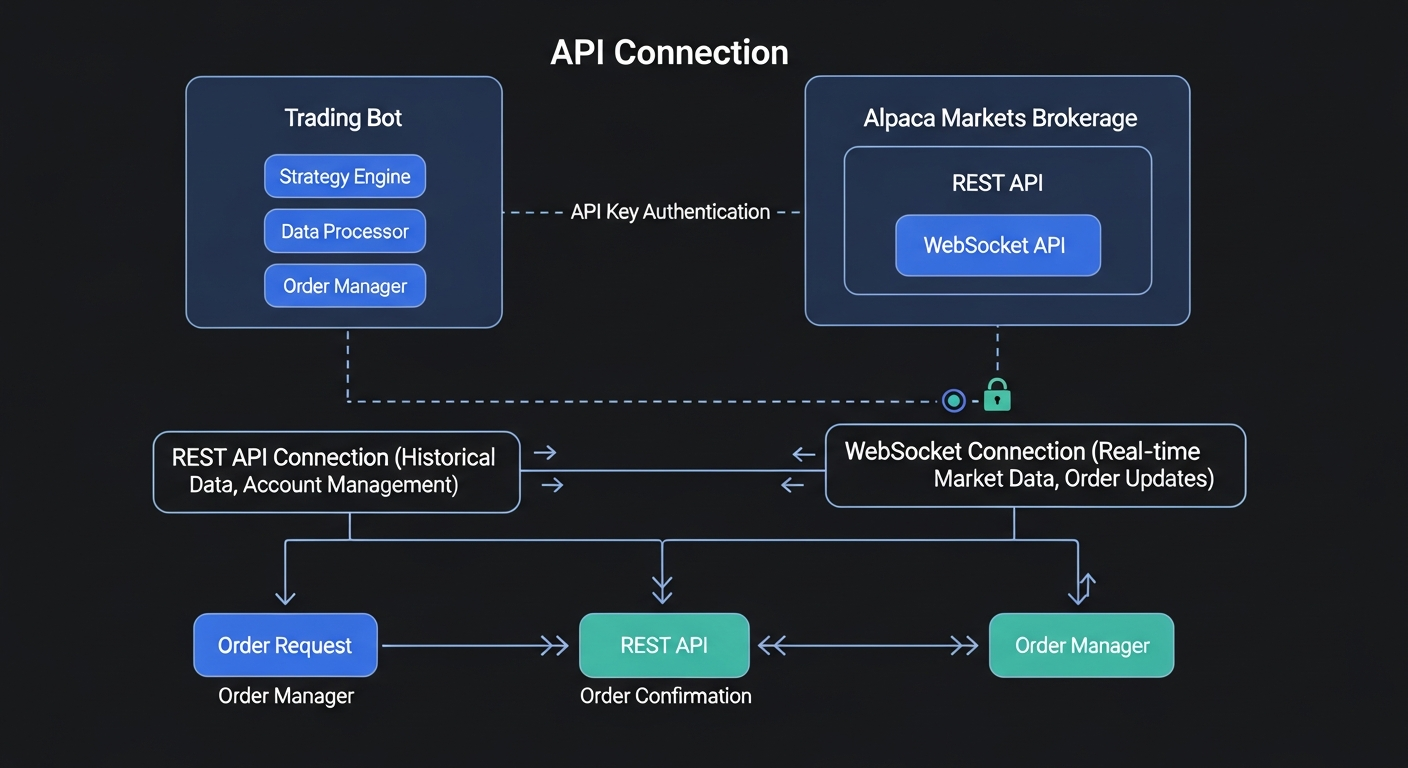
REST and WebSocket APIs. REST for order management and account data; WebSocket for streaming real-time market data and order updates. Both are well-documented with libraries available in Python, JavaScript, Go, and other languages.
Generous free tier. Alpaca's free plan covers most use cases for retail automated traders. Paid plans unlock additional data features and higher API rate limits.
Step 1: Create Your Alpaca Account
Go to alpaca.markets and sign up for an account. The signup process requires standard identity verification — name, address, and a government ID. Approval is typically fast, often within a few minutes during business hours.
You don't need to fund your account to start. Alpaca's paper trading environment is available immediately after account creation, which is where you should start anyway.
Once logged in, you'll see two environments in your dashboard: Live Trading and Paper Trading. Keep them clearly separate in your bot configuration — they use different API keys and different base URLs.
Step 2: Generate Your API Keys
From your Alpaca dashboard, navigate to the API Keys section (usually found under your account settings or the trading dashboard sidebar).
Generate a key pair for paper trading first. You'll receive an API Key ID and a Secret Key. The secret key is only shown once — copy it immediately and store it somewhere secure like a password manager or environment variable file.
When you're ready to go live, generate a separate key pair for your live trading account. Never use your live API keys during development or testing.
Your API keys should be treated like passwords. Don't commit them to GitHub or include them in code files. Use environment variables or a secrets manager instead.
Step 3: Understand the API Endpoints
Alpaca uses different base URLs for paper and live trading:
Paper trading base URL: https://paper-api.alpaca.markets Live trading base URL: https://api.alpaca.markets Market data (same for both environments): https://data.alpaca.markets
When configuring your bot, make sure you're pointing to the right base URL. A common mistake is accidentally sending paper test orders to the live endpoint — or vice versa.
Step 4: Choose Your Integration Method
How you connect Alpaca to a trading bot depends on what kind of bot you're running.
Code-Based Bots (Python, JavaScript, etc.) If you're building your own bot or using a framework like Zipline, you'll use Alpaca's official SDK. The Python SDK (alpaca-trade-api or the newer alpaca-py) handles authentication, order submission, account queries, and data streaming. Install via pip and configure with your API keys and the appropriate base URL.
No-Code Platforms If you're using a no-code or low-code automation platform, look for built-in Alpaca connectors. Platforms like TradersPost have native Alpaca integration — you connect your account once via API keys and then route trading signals (from TradingView, for example) directly to Alpaca without writing any code.
TradingView Webhooks TradingView strategies can fire webhook alerts that trigger Alpaca orders through a middleware service. You write your strategy in Pine Script, set up alerts with the right payload format, and connect a webhook relay to your Alpaca account. This approach requires some initial setup but gives you access to TradingView's full indicator library without managing execution code yourself.
Step 5: Configure Your Bot for Paper Trading
Before connecting to live markets, run your full strategy in Alpaca's paper trading environment. The paper environment is designed to mirror live trading as closely as possible — same API, same order types, same data, with simulated fills based on real market prices.
Set your bot's base URL to the paper endpoint and load your paper trading API keys. Run the bot through at least a few weeks of market conditions before drawing any conclusions. Paper trading in a calm trending market tells you very little about how your strategy will behave during volatility.
Get the Top 5 Bots for Early Retirement report:
Pay attention to fill behavior. Paper trading fills are simulated, which means they won't perfectly reflect the slippage and partial fills you'll see in live markets — particularly for less liquid stocks or larger position sizes.
Step 6: Verify Your Configuration
Before going live, run through this checklist:
API keys: Confirm you're using the correct keys for the environment (paper vs. live). A mismatch here is the most common setup error.
Base URL: Double-check that your bot's base URL matches your intended environment.
Order types: Test every order type your bot uses — market orders, limit orders, stop orders, trailing stops. Confirm they submit and cancel correctly.
Account permissions: Verify your live account has the trading permissions your strategy requires. Options trading, for example, requires a separate approval process with Alpaca.
Position limits: Make sure your bot's position sizing logic won't try to buy more shares than your account balance allows. Alpaca will reject orders that exceed your buying power, but you want your bot to handle rejections gracefully rather than retrying infinitely.
Error handling: Test what happens when the market is closed and your bot tries to place an order. Test what happens if a network timeout occurs mid-order. Robust error handling separates production-ready bots from prototypes.
Step 7: Go Live
Once paper testing is complete and your checklist is clear, switch your configuration to the live endpoint:
Update your base URL to https://api.alpaca.markets. Load your live API keys (not your paper keys). Confirm your account is funded and your buying power is sufficient.
Start conservative. Run your live bot with reduced position sizes for the first few weeks. This lets you verify that live fills, slippage, and timing match your expectations from paper testing before scaling up.
Common Issues and How to Fix Them
Account not approved: Alpaca requires identity verification before allowing live trading. If your account is stuck in a pending state, check your email for follow-up requests or contact Alpaca's support team.
API authentication errors: Almost always caused by using the wrong key pair for the environment, or a copy-paste error in the secret key. Regenerate your keys if you're unsure.
Order rejections: Check your account's buying power and margin settings. Market orders during extended hours may also be rejected — Alpaca's paper environment trades standard market hours by default.
Rate limiting: The free tier has API rate limits. If your bot is polling account data or market prices too frequently, you'll hit 429 errors. Use WebSocket subscriptions for real-time data instead of frequent REST polling.
Data delays: Free tier users receive a slight delay on some market data feeds. If your strategy is sensitive to precise entry timing, review Alpaca's data tier options to understand what you're receiving.
Alpaca vs. Other Broker APIs for Automated Trading
Alpaca sits in a category alongside Tradier and Tastytrade as developer-friendly brokers with clean REST APIs. Here's how they compare for bot traders:
Alpaca is best for stock and crypto bots, particularly those requiring fractional shares or that are built in Python. It has the broadest community of bot developers and the most third-party integrations.
Tastytrade is the stronger choice for options automation — its platform is built for options traders and its API covers options-specific order types and Greeks data that Alpaca doesn't expose as cleanly.
Tradier is a solid alternative for US stock trading bots, with a well-documented API and competitive data offerings.
Interactive Brokers offers the widest market coverage (stocks, futures, forex, options globally) but has a more complex API that takes longer to work with.
For most traders building their first stock or crypto trading bot, Alpaca is the lowest-friction starting point.
The Bottom Line
Alpaca's combination of commission-free trading, a clean API, and built-in paper trading makes it one of the best broker choices for automated trading in 2026. The setup process is straightforward: create an account, generate API keys, connect your bot to the paper endpoint, test thoroughly, then switch to live when you're confident.
The most important step is the one most traders rush: paper testing. Give your strategy enough market exposure in paper mode — covering at least one choppy period and one trending period — before committing real capital. The live environment will reveal any configuration gaps quickly enough, but you want to catch them in paper trading first.
Free Report
Before You Choose a Bot, Read This
Get our free Top 5 Bots for Early Retirement report plus The Bot Report newsletter — the bots we'd actually trust to compound over the long term.
Written by
Amara Okafor
9 min read
Amara Okafor is an investment analyst and writer exploring how automation, AI, and disciplined risk control intersect for modern traders.
How to Choose the Best Trading Bots for Your Strategy
Take our free quiz to show how to pick bots that actually work for you
Get My Free Bot Report
Get Our Expert Bot Recommendation
Skip hours of research. Our experts have tested dozens of trading bots so you don’t have to. Answer 6 quick questions and get a personalized recommendation based on your trading style and goals.”
Join The Bot Report newsletter and get our free guide to the five trading bots most likely to help you retire early — backed by real reviews and verified performance.